
When you make the “ProgramData” folder visible, you’ll be able to access the following data folders:
C:\ProgramData\Kofax\Kofax Express 3.X
C:\ProgramData\CaptureBites
or on Windows XP, this will be the following data folders:
C:\Documents and Settings\All Users\Application Data\Kofax\Kofax Express 3.X
C:\Documents and Settings\All Users\Application Data\CaptureBites
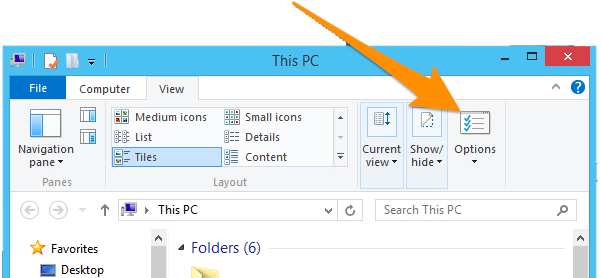
Open the File Explorer and, in the windows’ ribbon, go to the “Options” panel:

Go to the “View” tab and enable ” the “Show hidden files, folders, and drives” option from the “Advanced settings” list.

Press “Apply” and “OK”.
Open “My Computer” or File Explorer and, in the windows’ ribbon, go to the “Options” panel:
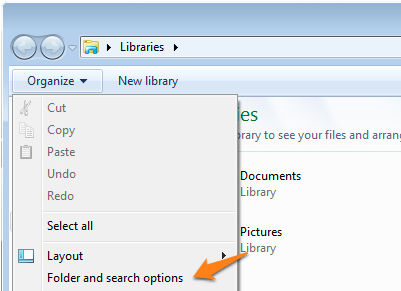
Open “My Computer” or File Explorer and open the “Organize” dropdown menu in any folder. Select “Folder and search options” from the menu.
Open “My Computer” or the File Explorer and, in the windows’ ribbon, go to the “Tools” menu. Select “Folder options”.
Go to the “View” tab and enable ” the “Show hidden files, folders, and drives” option from the “Advanced settings” list.
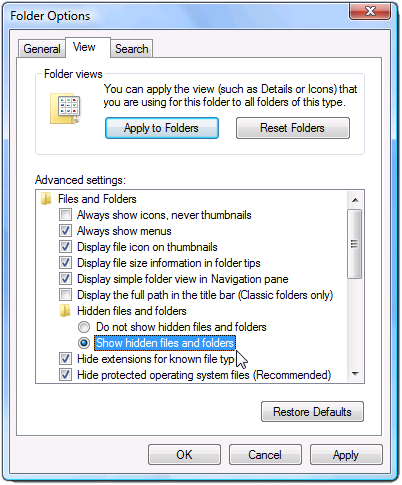
Press “Apply” and “OK”.