
Blog > What is FADGI Compliance?
What Is "FADGI"? And why does it matter when digitizing documents?
FADGI stands for the "Federal Agencies Digital Guidelines Initiative". It's a set of technical guidelines, developed collaboratively by U.S. federal agencies, that defines what "high quality" means when you turn a physical document, photo or piece of archival material into a digital file.
FADGI exists because a scanned document is only useful if it's an accurate copy of the original. The guidelines cover things like resolution, color accuracy and how consistently equipment performs over time, so that a digitized file can be trusted as a real stand-in for the paper version.
FADGI itself isn't a law. The legal requirement comes from the U.S. National Archives (NARA), whose rules for digitizing permanent federal records are based on FADGI three-star quality levels. Outside the U.S. there's no equivalent legal requirement, but similar guidelines exist, such as ISO 19264-1 and the Dutch Metamorfoze guidelines. That said, more and more private companies worldwide use FADGI as a practical benchmark even outside the U.S. context it was built for.
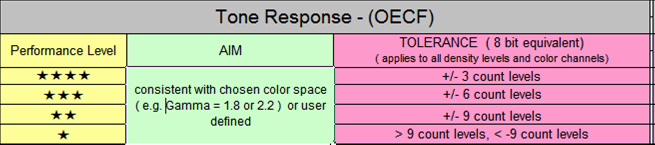
FADGI compliance is measured on a scale from one to four stars:
- *1 star: Basic quality, informational only. Not suitable for OCR or reuse.
- **2 stars: Acceptable for access copies, but not recommended for preservation.
- ***3 stars: Very good, professional quality. NARA's requirements for digitizing permanent federal records are based on this level.
- ****4 stars: The top tier, used when nothing short of a near-perfect digital copy will do.
The rating is based on measured image quality: resolution, tone and color accuracy, noise and uniformity, checked against standard test targets. It's determined at the moment of capture, by the scanner and how it's calibrated.
FADGI itself is a U.S.-only requirement, tied to U.S. federal digitization projects. But the underlying discipline it enforces isn't a U.S.-specific problem.
Think about what happens to a document after it's scanned. It gets stored, compressed, backed up, moved between servers, opened again months or years later. Every one of those steps is a chance to lose a little bit of quality.
For any business, anywhere in the world, that's not just an inconvenience. It can mean:
- Contracts or invoices that are technically stored but practically unreadable
- Compliance and audit trails that don't hold up to scrutiny
- Archived materials that degrade every time they're touched
Capturing a document accurately once and keeping it that accurate for as long as you need it, is really just good document management discipline.
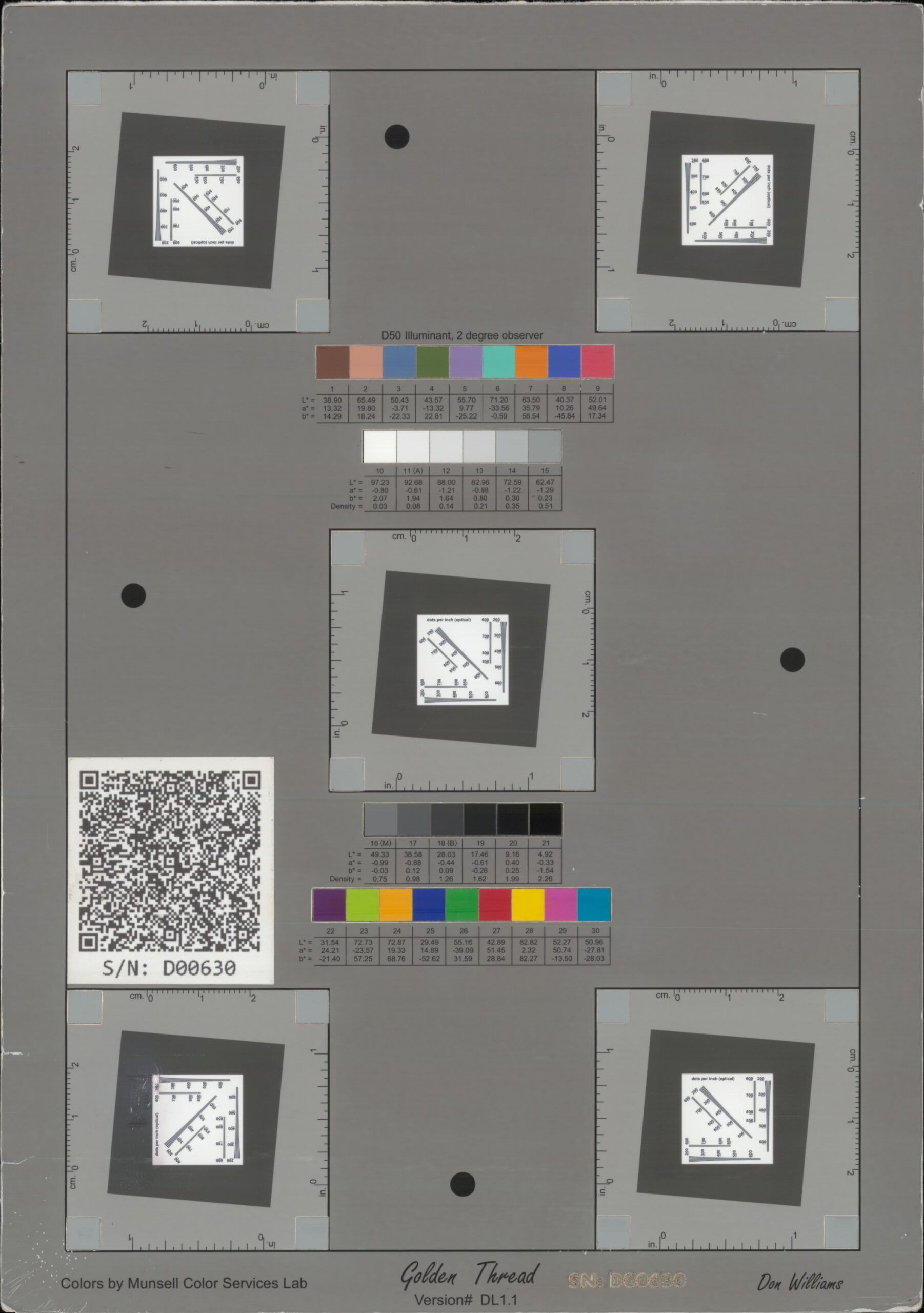
A FADGI compliancy test sheet. Its colors, gray tones and patterns show whether the scan is sharp, accurate and true to size.
FADGI compliance is achieved at the scanner. A file is FADGI compliant when it's captured on properly calibrated equipment that meets the required star level. MetaServer doesn't scan, so it doesn't make a file FADGI compliant. What it does, is make sure that the compliant file remains untouched while extracting data from it.
Your compliant original, preserved
Your master file stays untouched. When a FADGI-compliant scan enters MetaServer, the original can be saved as-is to the location of your choice. That's your preservation copy.
Processing happens on working copies. Extraction, classification, separation and conversion are applied to the copies MetaServer works with. These processed files serve your document management needs; they're not meant to replace the master.
The original travels with the result. After processing, MetaServer can export the original file alongside the processed output, so the compliant master is always available wherever your documents end up."
Super compression, without the quality trade-off
Super compression is interesting for anyone running document-heavy systems on the web. MetaServer's Convert to PDF MRC module (Mixed Raster Content) can shrink a file to roughly a tenth of its original size, while keeping it visually indistinguishable from the original to the naked eye.
MRC is a compressed access copy, not a preservation master, so it's the ideal companion to an untouched original:
1) The master for the archive
2) The MRC version for everyday use
In practice, that means:
- Faster load times for documents accessed through web portals or browser-based tools
- Lower storage and transfer costs at scale, since most infrastructure today runs through web servers
- Your original master file stays available, untouched, for archival and compliance purposes
That combination, an untouched FADGI-compliant master paired with lightweight working copies, lets MetaServer support compliance-conscious environments.
FADGI is a set of U.S. federal guidelines, so it's not something every business needs to chase. But the idea behind it is universal: Capture it right, keep it right, no matter how many times it's stored, moved or compressed.
Your scanner captures your image right. MetaServer helps keeping it right: the original preserved, the working copies optimized for how your business uses them.