
Blog > Something new is coming to MetaServer!
Something new is coming to MetaServer!
CaptureBites is proud to announce that we are close to finalizing MetaServer Web Client, a new way to work with MetaServer from anywhere and from any device. With browser-based document capture, your team can upload documents, choose the right workflow and validate the captured data in any web browser. There is no software to install and no need to sit at a dedicated workstation.
The result: invoices, orders and other business documents keep moving, whether your people are at the office or working from home.
Secure sign-in from any device
Getting started takes a web browser and your login. Go to your company's MetaServer address (for example metaserver.yourcompany.com) and sign in with your username and password.
- Personal credentials for every user
- Access managed centrally
- OAUTH authentication
- Only registered users can import and validate documents for their assigned workflows
Three steps from upload to approved data
- Upload your documents through your browser or watch an email inbox. You can also upload documents through your own application through REST API.
- Pick the workflow linked to the document type, for example invoices or purchase orders.
- If required, check the extracted data, correct where needed and approve.
Every document automatically checked before it moves on
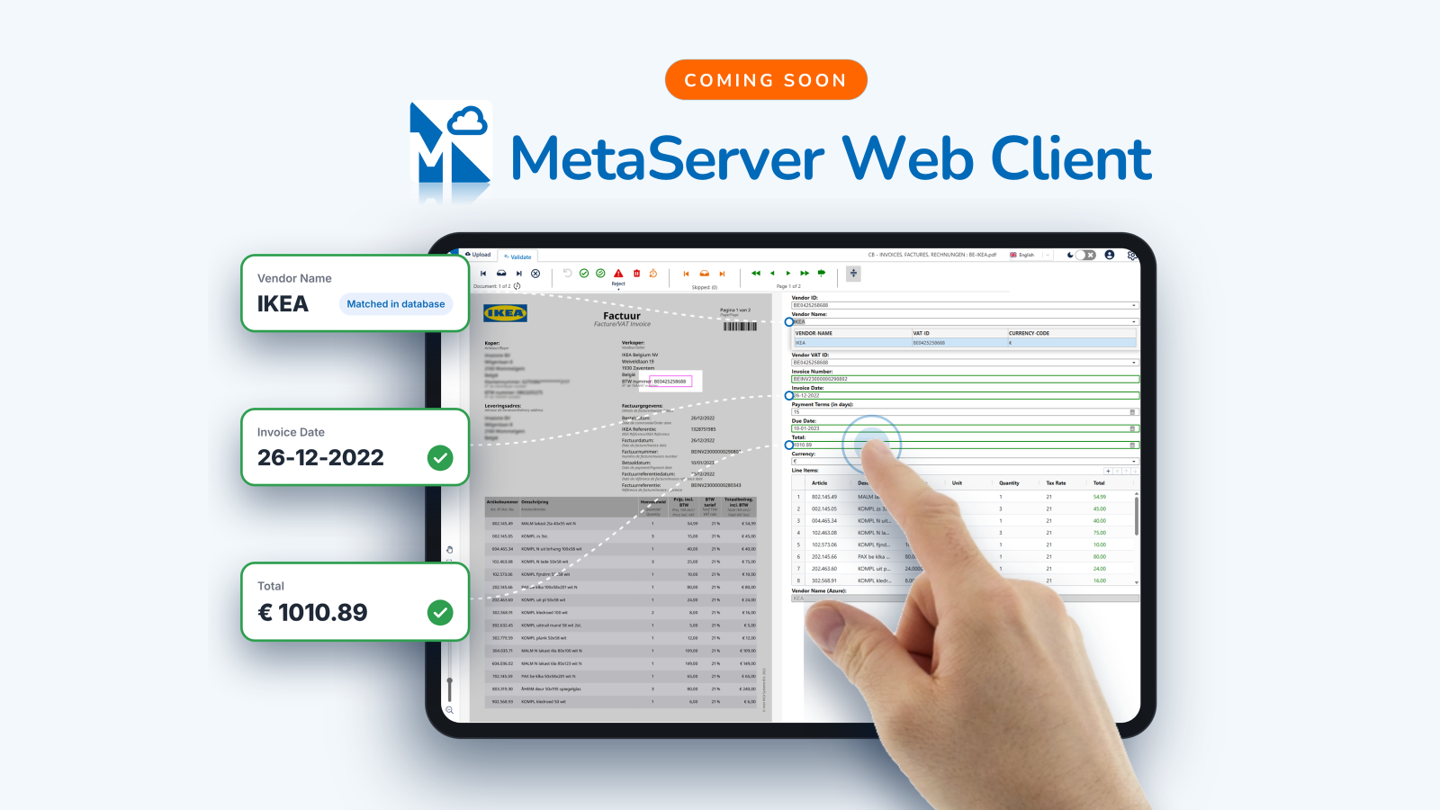
If a document requires a validation step, you can easily check this in the validation screen.
The source document and the captured data sit side by side, so users can confirm each field at a glance.
- See source and data side by side. The original document on the left, the extracted fields on the right.
- Correct a field in 1 click. Fix a value directly on screen, without retyping the whole document.
- Approve to export your data. Once approved, MetaServer sends the validated data on to your target systems.
Take a supplier invoice as an example. MetaServer reads the vendor name and matches it against your database, then captures the invoice date, the total amount and the individual line items. The validator only needs to confirm the values and approve.
The Web Client brings the two key steps of document capture, import and validation, to your web browser.
It also opens a direct route for documents coming from your other business systems.
- Browser import. Users upload documents from any browser and pick the matching workflow.
- Email import. Documents can be automatically fetched from email.
- REST API import. Your own applications send documents straight to MetaServer through our REST API. No manual upload needed.
- Browser validation. Users check and correct the extracted data on screen, then approve it.
Intelligent document processing has transformed how organisations handle paperwork. MetaServer reads incoming documents, extracts the relevant data and delivers it to the systems that need it, such as your ERP, DMS or accounting software.
Yet one step will always benefit from a human eye: confirming that the captured data is correct before it is processed. Until now, that step was tied to a workstation with the MetaServer client installed.
We listened to our customers and partners, and the message was clear: document capture should go where the work goes. The MetaServer Web Client is our answer.
What is the MetaServer Web Client? The MetaServer Web Client lets users import and validate business documents in MetaServer from any web browser. It covers document upload, workflow selection and data validation, plus automated import through a REST API or email.
Do I need to install software to use it? No. Users only need a web browser and their personal login. There is no software to install on their PC.
Can I send documents to MetaServer automatically? Yes, documents can still be automatically fetched from email or a watched folder.
On top, you can also upload documents through REST API. With this, your can upload documents through your own application.
Is browser-based document capture secure? Every user has personal credentials, access is managed centrally, and OAUTH authentication is supported.
Only registered users can import and validate documents for their assigned workflows.
When will the MetaServer Web Client available? The MetaServer Web Client is estimated to release in Q1 2027.
Contact CaptureBites to receive more information.