
MetaServer > Help > Troubleshoot > Error .NET Framework on Windows Server 2019
A .NET Framework error interrupts my MetaServer installation on Windows Server 2019
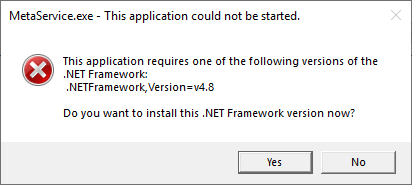
When you install MetaServer on a system with a .NET Framework version below version 4.8, the installer will show the following error and installation request:
"This application requires one of the following versions of the .NET Framework:
.NETFramework, Version=v4.8.
Do you want to install this .NET Framework version now?"
Solution:
To resolve this issue, you'll need to install the .NET Framework version 4.8.
Step 1: Press the "Yes" button to be redirected to the Microsoft download page
https://dotnet.microsoft.com/en-us/download/dotnet-framework
WARNING: The latest version of the .NET Framework, currently version 4.8.1 shown at the top of the list, however, Windows Server 2019 is not compatible with .NET Framework 4.8.1.
Just install version 4.8 found in the same list. This version is compatible with Windows 2019 and MetaServer.
Step 2: We recommend restarting your server after the .NET Framework installation.
Step 3: After you have finished the .NET Framework installation, don't forget to restart the MetaServer installer so it can install all required files without interruption.
WARNING: If you forget to restart your MetaServer installation, Kofax VRS files will be missing and you won't be able to use the "Deskew" option in the Extract action's Extract rules or the Kofax VRS action.