
MetaServer > Help > Server > MetaServer User Groups
220-030 MetaServer User Groups
With MetaServer User Groups, you can create user groups without the need for Active Directory adjustments.
With this, the Reserve rule can now be used to reserve documents for:
- An individual user
- An Active Directory User Group
- A MetaServer User Group
For example, a department in a larger company does not necessarily have the rights to create AD user groups. Creating an internal MetaServer User group makes managing user groups very flexible.
Step 1: Open the MetaServer Administration Client and go to the Server tab
Step 2: Press the "Users" button
Step 3: Press the "MetaServer User Groups" button
Step 4: Within this setup window, you can Add a new MetaServer User Group, or Edit or Delete an existing one in your User Group list.

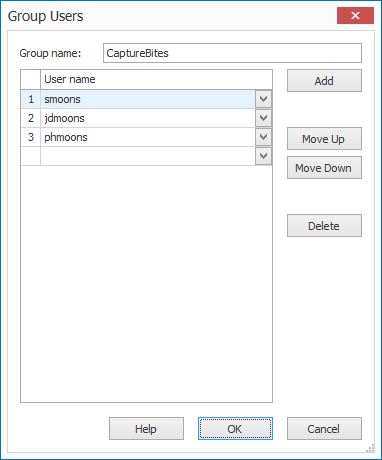
01 - Group name: Enter the name of your user group.
02 - User name: Enter the user name that needs to be part of this User Group.
If you are not sure what the correct user name is, run Netplwiz on the user's machine and lookup the correct user name in the user name properties.
REMARK: When a User Group is adjusted, clients will refresh when:
- They change tabs
- They restart their client
- They open the Users overview
After setting up your MetaServer User Group, you can automatically reserve each document for the specified MetaServer User Group or individual user within that MetaServer User Group. You do this within an Extract action of your workflow and using the Reserve rule.
You can find more detailed information on how to set up a Reserve rule for a "MetaServer User Group" or user here:
https://www.capturebites.com/metaserver/help/extract/120-450/#02